CLI
Use soma to run experiments, discover components, score
predictions, reproduce benchmarks, and compare completed runs.
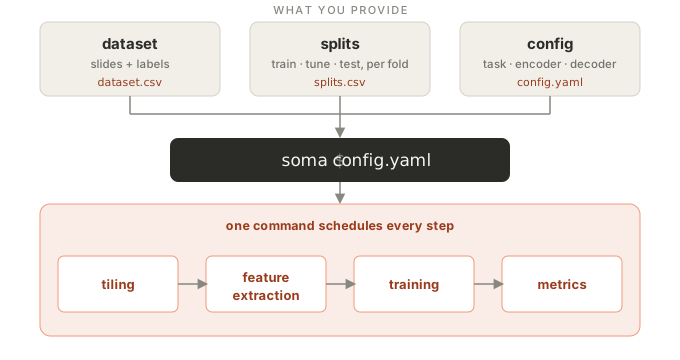
You provide three files — a dataset, splits, and a config. soma then
schedules every step: tiling, feature extraction, training, and metrics.
Basic usage
soma run runs a YAML config:
soma run /path/to/config.yaml
or a preset on your cohort (see Use cases):
soma run --preset mil_classification --encoder uni2 \
    --cohort dataset.csv --splits splits.csv --out runs
A config is edited, not overridden: there are no override flags. To start from a preset and change it, print it as YAML with every default filled in, edit the file, and run it:
soma init mil_classification --encoder uni2 > experiment.yaml
soma run experiment.yaml
Use soma --help or soma COMMAND --help for command options.
Train on features you already have with --feature-dir: the directory of a
pooled feature cache (slide, patient and tile runs) or of dense grids
(segmentation and detection). The run attaches it and extracts nothing:
soma run config.yaml --feature-dir runs/features/uni2
soma prints soma’s INFO log messages to stderr, and warnings and errors
from other libraries. See Log output for the same behaviour in a Python
script.
Available commands
soma run CONFIG [--feature-dir DIR]Run an experiment from a YAML config file, optionally on pre-extracted features. The run directory keeps the config as given (
config.yaml) and its resolved plan (plan.yaml), written before training starts;soma run plan.yamlreplays a run with every value pinned.soma run --preset NAME --cohort CSV --splits CSV --out DIR [--seed N] [PRESET ARGUMENTS] [--feature-dir DIR]Run a preset on a cohort: the preset’s own arguments are flags (
--encoder,--aggregator,--decoder;soma run --preset NAME --helplists them), its required ones are required, and--seeddefaults to 0. The registered presets:detection(encoder, decoder, num_classes=1, match_distance=3.0)— Detect cells: a decoder over a frozen encoder’s dense token grid, one heatmap per class.mil_classification(encoder, aggregator="abmil")— Classify whole slides: a frozen tile encoder, a MIL aggregator and a classifier.segmentation(encoder, decoder, num_classes=2)— Segment tissue: a decoder over a frozen encoder’s dense token grid.survival(encoder, aggregator)— Predict survival from whole slides: a discrete-time hazard head over a MIL bag.tile_classification(encoder)— Classify tile images: a linear probe on a frozen tile encoder’s embeddings.
soma init NAME [PRESET ARGUMENTS]Print the preset as an editable YAML config with every component’s params at their defaults. Fields the cohort or the machine decide are
null; pointcohort.recordsandcohort.splitsat your files beforesoma run.soma list [KIND] [--level {tile,slide,patient}]Without
KIND, list the component kinds:aggregators,augmentations,benchmarks,callbacks,decoders,encoders,heads,learners,optimizers,presets,samplers,schedulers. With aKIND, list its registered components and the default of each of their params;soma list benchmarksprints the namessoma reproduceandsoma leaderboardaccept.--levelnarrows the encoders totile,slide, orpatient.soma.components()returns the same listing in Python.soma evaluate PREDICTIONS --cohort CSV [--splits CSV --split NAME --fold N] [--metrics M ...] [--subgroups COL ...] [--out JSON]Score saved predictions against the targets in
dataset.csv, joined bysample_id; no run directory is needed.PREDICTIONSis a predictions parquet, a points parquet (detection), or a label-map directory (segmentation). A predictions parquet is scored against the cohort’s target columns, points against the files in itspoints_pathcolumn, and label maps against the class-index masks in itslabel_mask_pathcolumn.--splitsselects one split (defaulttest) of one fold (default0); without it every row of the cohort is a target. Every prediction needs a target and every target a prediction.--metricstakes metric names or dotted import paths (default: the task family’s defaults);--subgroupsnames metadata columns to break the metrics down by. The metrics table is printed;--outalso writes the evaluation as JSON. See Evaluation.soma compact-index OUTPUT_ROOTCompact
indexes/runs.csvto the latest row per run. Readers already deduplicate the append-only index; compaction saves space. A path to the CSV itself is also accepted. See Run outputs.
Benchmarking commands
soma prepare-croma RAW_ROOT [--rebuild]Download and decode the pinned PathoROB tile sources for CRoMa.
--rebuildreplaces a partial or revision-mismatched destination.soma reproduce NAME [--encoder NAME | --encoders NAME [NAME ...]] [--raw-root DIR | --curated-dir DIR | --from-run-dir DIR] [--seeds N]Curate, run, and score a registered benchmark.
NAMEis a benchmark (ocelot,eva/bach) or a family prefix (eva).--raw-rootcurates from raw data,--curated-dirreuses prepared manifests, and--from-run-dirrescores one existing run.--encodersruns an ordered panel and writes one leaderboard per benchmark.--seeds Nruns seeds 0 through N−1.--output-root,--cache-root, and--out-dirplace run artifacts, shared features, and curated manifests;--recordappends the score to the benchmark’s results ledger,soma/benchmark/<protocol>/results.csvnext to itsreference.csv. See Benchmarking for panel validation, partial failures, and reference comparisons.soma leaderboard [NAME] --root OUTPUT_ROOT [--vary AXIS] [--fix AXIS=VALUE] [--like DIR]Render a faceted leaderboard over the completed run dirs under an output root. A benchmark
NAMEsupplies the canonical facet and reference band;--vary/--fix/--likeshape the facet on top of it.
Full config reference
A config has seven sections, one per public callable: run holds
Pipeline’s keywords, cohort the cohort’s,
features the feature source’s, loaders the data loaders’, learner
the learner’s, trainer the Trainer’s and
evaluation evaluate()’s. The YAML below is
examples/reference.yaml: a slide-level classifier with every other field
at its default. A config states only what differs; soma.resolve() fills
in the rest and writes it to the run’s plan.yaml. Component params
({name, params}) are listed by soma list KIND. See
Configuration.
run:
  output_dir: runs
  seed: 0
  folds: null
  run_id: null
  resume: false
  mirror_root: null
cohort:
  records: data/dataset.csv
  splits: data/splits.csv
  collapse: null
  tune_is_test: false
  allow_missing_tune: false
features:
  kind: cached
  encoder:
    name: uni2
    params: {}
  extraction:
    tiling: null
    segmentation:
      method: hsv
      downsample: 64
      sthresh: 8
      sthresh_up: 255
      mthresh: 7
      close: 4
      sam2_checkpoint_path: null
      sam2_config_path: null
      sam2_device: cpu
      sam2_num_workers: null
    filter: null
    preview:
      save_mask_preview: true
      save_tiling_preview: true
      downsample: 32
      tissue_contour_color:
      - 157
      - 219
      - 129
      mask_overlay_alpha: 0.5
    masks:
      pixel_mapping:
        background:
        - 0
        tissue:
        - 1
      colors:
        background: null
        tissue:
        - 157
        - 219
        - 129
      min_coverage:
        tissue: 0.01
      output_mode: per_annotation
      strategy: joint
    requested_region_size_px: null
    region_tile_multiple: null
    read_coordinates_from: null
    read_tiles_from: null
    on_the_fly: true
    save_tiles: false
    gpu_decode: false
    adaptive_batching: false
    use_supertiles: true
    jpeg_backend: pil
    num_cucim_workers: 4
    resume: false
  execution:
    output_dir: null
    output_format: pt
    batch_size: 32
    num_workers_per_gpu: null
    num_preprocessing_workers: null
    num_gpus: null
    precision: null
    output_dtype: null
    prefetch_factor: 4
    save_tile_embeddings: false
    save_slide_embeddings: false
    save_latents: false
    on_image_mismatch: raise
  dense: null
  cache:
    enabled: true
    root_dir: null
    reuse_policy: strict
    validate_payloads: false
    dtype: null
    on_identity_mismatch: error
  spacing_policy: strict
loaders:
  batch_size: 1
  num_workers: 0
  pin_memory: false
  persistent_workers: false
  sampler: null
  augment: null
learner:
  name: mil
  params:
    aggregator:
      name: abmil
      params: {}
    head:
      name: binary_classification
      params: {}
trainer:
  max_epochs: 50
  max_steps: null
  accumulate_grad_batches: 1
  val_every_n_epochs: 1
  device: auto
  precision: fp32
  callbacks:
  - name: checkpoint
    params: {}
  - name: early_stopping
    params: {}
evaluation:
  metrics: []
  subgroups: []
  holdout_test: false
  overwrite_test: false
  save_overlays: true
  save_probabilities: false
  save_heatmaps: false
  attention_heatmaps: null
  representation: null